

Bombardier - Myinflight
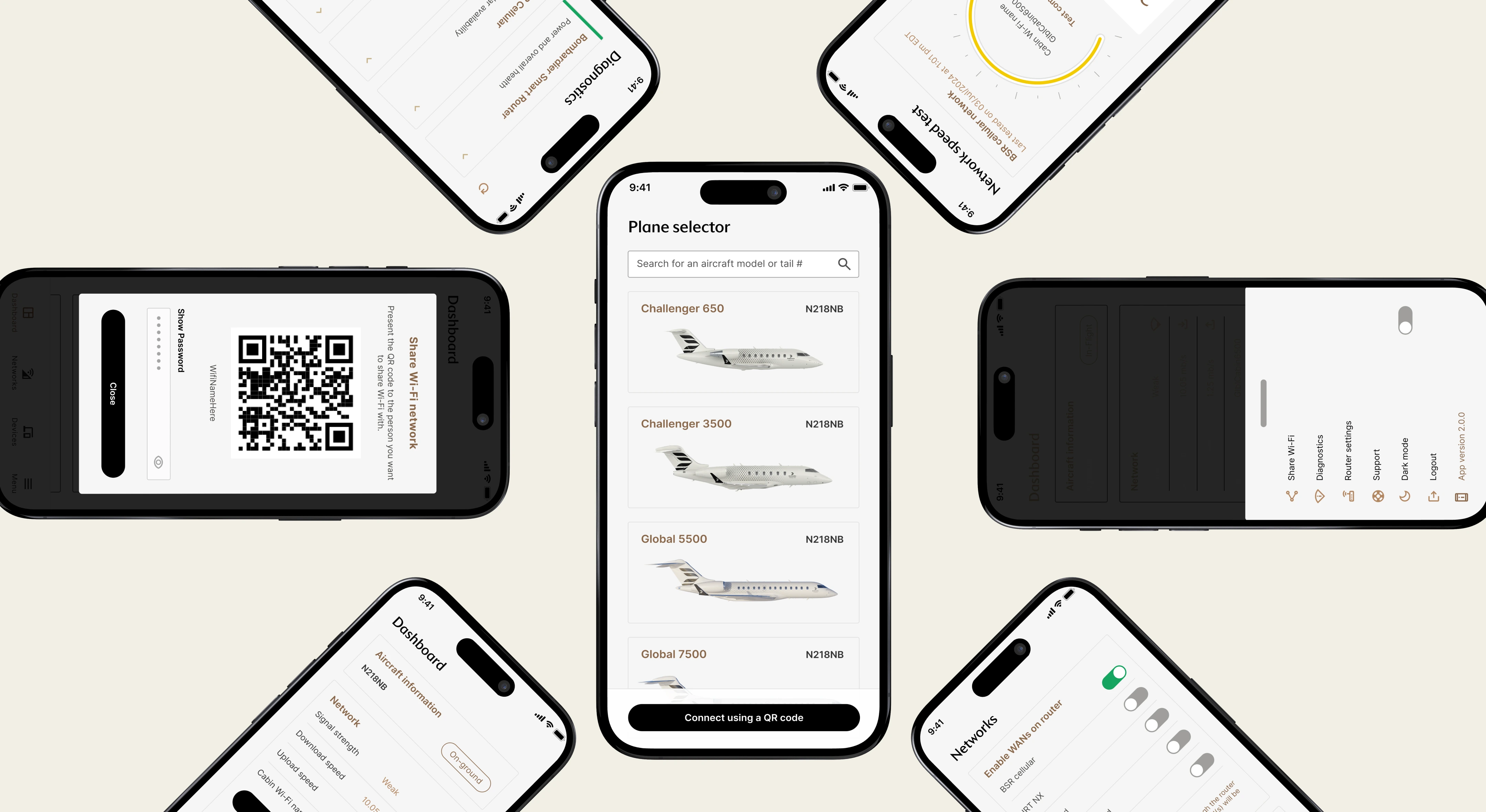
MyInFlight is an avionics app for setting up aircraft connectivity, checking network health, and troubleshooting issues in the air or on the ground.
36%
42%
2×
How can we reduce setup friction and empower crews to troubleshoot connectivity issues on Bombardier’s newest aircraft systems?
Bombardier’s new onboard router needed two connected tools: a web interface for technicians to configure installations and a mobile app for flight crews and maintenance staff to test connectivity and diagnose problems. The work covered setup, in-flight troubleshooting, and post-flight review. We wanted to reduce setup errors, shorten deployment time, and help crews resolve common issues without calling support.
Router setup for technicians
Web setup for technicians
The web tool guided technicians through binding a router, checking the configuration, and preparing a handoff summary for the DOM. We replaced technical language with task-based instructions so the setup was easier to follow in the field.
Technicians could bind routers, configure installations, and return to saved bindings without digging through technical settings.
40% faster setup on average, with fewer support tickets and misconfigurations.
In-flight troubleshooting
Flight crews could run speed tests, review diagnostics, and check network health without calling technical support.
25% fewer inflight support tickets during pilot phase, with most issues resolved directly through the app.
Self-service diagnostics
Maintenance teams could see overall system health and component-level faults without digging through technical logs.
Instead of raw logs, DOMs saw which component had failed, where it was located, and what to check first.
85% of users resolved technical issues without IT during testing, even in low-connectivity conditions.
Switching between aircraft
The plane selector let operators move between aircraft without leaving the dashboard.
Diagnostics and settings changed with the selected aircraft.
The same structure worked for a single aircraft or a larger fleet.
During testing and rollout, operators spent 60% less time switching between aircraft systems.
I joined after development had started and introduced research to test the team’s assumptions, understand each role, and find where the product needed more flexibility.
The router hardware was still being finalized while the application was already in development. I worked with engineers to understand what the system could support, then interviewed crews and maintenance teams to see where setup and troubleshooting broke down. Those findings gave us a clearer direction for a product used by several roles in very different situations.
Reviewing existing router apps

We reviewed Netgear, TP-Link, and Eero to see which patterns users would already recognize. Speed tests, signal indicators, and device management were common. None of the products we reviewed supported multi-aircraft or fleet workflows, and many buried diagnostic information behind technical language.
What we carried forward:
Prioritize plain-language network health visuals
Introduce a dynamic aircraft selector for multi-plane owners
Design a modular dashboard that could expand over time, unlike static consumer router apps
Interviews with crews and technical teams
The first person troubleshooting Wi-Fi was often a flight attendant or pilot.
At first, we assumed maintenance teams would handle most router setup and troubleshooting. Interviews showed something different: flight attendants were usually the first to respond in the air, and on smaller aircraft that often meant the pilot. Directors of Maintenance typically stepped in only after landing.
I spoke with engineers about technical constraints, DOMs about post-flight diagnostics, and flight attendants about what needed to feel clear in the moment. Their comfort with technology varied, but they shared the same goal: get the Wi-Fi working without guessing. On board, Wi-Fi problems become everyone’s problem quickly.
The product needed to support several roles, not one expert user. We used that finding to decide which features to prioritize and how much guidance each flow needed.
Ensure a seamless connectivity experience for every user, whether they’re prepping the aircraft, troubleshooting in the air, or reviewing performance on the ground?
Designing the system behind the screens
Mapping each role before designing the screens
Once we understood the roles involved, I mapped the work around real tasks: setup, handoff, in-flight checks, and post-flight diagnostics. Product, engineering, and operations reviewed the flows together so we could agree on scope and catch technical constraints early.
Those maps helped us see where one shared experience would work and where a role needed different information or guidance.
Mapping the edge cases
Before designing the interface, I mapped how flight crews and maintenance teams would move through the system. The flows included the expected paths as well as failed setup, weak connectivity, incomplete handoffs, and other situations that could create problems mid-flight.
Reviewing the maps with engineers exposed feasibility issues early and gave us a solid structure for the prototype. It also kept the experience consistent for people with very different levels of technical confidence.
Feature priorities and early wireframes
Choosing what had to ship
Before wireframing, we used the MoSCoW method to agree on what had to ship and what could wait.
Simplify decisions by removing low-impact ideas
Ensure feasibility across engineering and design
We tested the prototype with pilots, technicians, flight attendants, and Directors of Maintenance.
We ran sessions in the air and on the ground to see where setup, system status, or the next step still caused hesitation. What we saw in those sessions guided the changes that followed.
What testing changed
What changed after testing with crews
Pilots, Directors of Maintenance, flight attendants, and aircraft technicians tested the prototype in the air and on the ground. We ran a mix of in-person sessions, remote walkthroughs, and contextual interviews.
We watched for moments where terminology, status information, or the next step caused hesitation. Their feedback confirmed what was working and showed us where the setup and diagnostic flows still needed to be simpler.
What we changed
The internet test was the tool crews used most, so we moved it to the front of the diagnostics dashboard. We clarified labels, used aviation-aligned status colours, and made key tools easier to reach. For technicians, we replaced jargon with task-based instructions and added printable installation summaries for cleaner handoffs to DOMs.
Each change came from something we saw or heard in testing.
What changed after the redesign
The redesigned setup and diagnostic flows helped crews complete connectivity checks faster, reduced requests for support, and gave users more confidence in what to do next.
The results in context
After we simplified the diagnostics dashboard and setup instructions, task completion improved by 36% during simulated flights, router-setup support requests fell by 42%, and reported confidence doubled.
The numbers matched what we heard in testing. Technicians had clearer handoffs and fewer places to guess. Maintenance teams needed less onboarding, and crews could handle more connectivity checks without calling support.
One DOM said, “This version feels like it was actually made for us. I can print what I need, and everything’s where I expect it to be.” A technician told us, “I don’t need to guess what goes where anymore. The steps make sense. I just follow them.”
If I had more time...
- Add smart defaults and a short first-use walkthrough.
- Test more edge cases for each crew role.
- Make the most relevant system information easier to find.
- Let crews tailor the dashboard to the way they work.
What I learned and what I’d change
The biggest gains came from clearer labels, fewer setup decisions, and diagnostics tailored to each role. Mapping complete workflows also helped the team make better decisions than designing screens one at a time. If I returned to the project, I’d push the modular approach further so crews could surface the tools and information they use most.
Thank you.